Screen time
Screen time
Screen time is today’s most asked-about parenting question, and the least usefully framed. We look wider: at what the screen is replacing, what your child is reaching for, and what’s going on around it. These pages are for the parent who wants to set the rules without losing the relationship.
What the library says about this, on one page. It is also online at theparentbook.com/help/screen-time
What to do first
You haven’t lost this argument, and you aren’t the only parent having it. The useful thing to ask is what those hours on a screen are taking the place of.
- For three days, watch without policing. What is she doing on there, and what isn’t happening because of it?
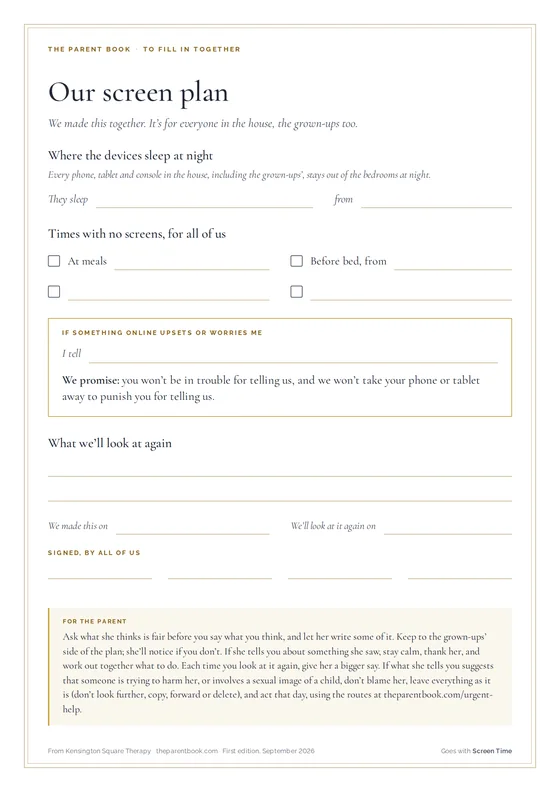
- Change one boundary, not five, and make it apply to the whole household: phones charge in the kitchen overnight, everyone’s included.
- Ask her to show you something she likes on it. You’ll see more of her online life by being curious than by checking up on her.
What helps
- Keep devices out of bedrooms at night. Charge devices in the kitchen overnight, including yours. What you do counts as much as the rule you set.
- Turn screens off 45 to 60 minutes before bed. The brain needs to wind down before it can sleep. Use the time for reading, a bath or talking together.
Some tips to try
Short pieces from the library, and a first thing to try from each.
-
Ask What She Watches, Not How Long.
Asking what she watches online is harder than timing it, and more useful.
- Ask what she watched this week, not how long.
- Screen-time advice usually counts hours: how long, when, in which rooms. The harder and more useful question is what she is watching. A child can spend two hours a day on cookery videos and animal clips and be doing nothing a parent would worry about. Another child can spend twenty minutes a day on a platform that has, in a fortnight, served her a hundred pieces of content about self-harm, because she paused on one and the algorithm decided that was who she was.
-
The Apps You Chose for Her.
A four-year-old doesn’t choose her own apps, so choose them with care and review them as she grows.
- Choose deliberately: no ads, no in-app purchases, a clear endpoint.
-
Her First Tablet at Four.
At four, treat the tablet as yours, lent to her for short stretches with you nearby.
- Treat the tablet as yours, lent to her, with apps you have chosen.
The rest of each tip, with more to try and why it works, is in the library.
Something to do together
One meal without phones, yours first. One regular meal where every phone in the house, starting with yours, stays in another room.
What it is for. A child learns what a phone is for by watching what the adults use theirs for. If every phone goes into another room at one meal, it becomes something the family does, and you do not have to police it.
- The first step. Pick the meal you can keep most often: supper for some families, Saturday lunch for others.
- Say it once, as something the family does: “At supper the phones live in the hall, mine too.” There is no need to police it; your phone in the hall is the reminder.
When to get help. If something said at the table suggests that someone is frightening or hurting her, online or off, stay calm, thank her for telling you, do not promise to keep it secret, and act that day, using the routes under “If you need help right now”, at the foot of every page. If she has stopped seeing friends in person, her sleep has collapsed, or her mood drops hard whenever the phone is away, talk to your GP or her school’s pastoral lead. If she is avoiding family meals, eating less and less, or hiding food, do not wait: ask your GP for an early appointment.
The other three steps, and your part in it, are in the library.
If you want to read further
- Screen Time. For parents who have lost the argument about screen hours, and suspect it was never quite the right argument to have. theparentbook.com/reader/screen-time
- What Screen Time Actually Is. For parents who feel they have lost the argument about screens. theparentbook.com/reader/what-screen-time-actually-is
Worth your time
- A book for you: Media Moms & Digital Dads, Yalda T. Uhls. A developmental psychologist and former film executive sorts the research from the headlines on screens and social media, and helps parents make calm, informed decisions for their own family. uk.bookshop.org/p/books/media-moms-digital-dads-a-fact-not-fear-approach-to-parenting-in-the-digital-age-yalda-uhls/f9c0a32c48429592
- A book to read together: Blackout, John Rocco. A power cut sends a busy city family up to the roof, where they play, talk and look at the stars together. When the lights come back, they choose to keep them off. A warm book about family time. uk.bookshop.org/p/books/blackout-john-rocco/734cecfa88d39965
- Something to watch: How can I stop my child spending too much time online?, Childnet International, YouTube. Childnet’s calm advice for parents worried about how long their child spends online: looking at what they do, not just how long, and agreeing limits together. www.youtube.com/watch?v=f2oxLu9O79g
- Something to listen to: Screen Sense: Parenting in a Digital World, Prof Pete Etchells and Prof Andy Przybylski. Two leading UK screen-time researchers spend eight episodes on what the evidence does and does not show, the myth of the digital native, and how to have better conversations with children about devices. podcasts.apple.com/gb/podcast/screen-sense-parenting-in-a-digital-world/id1820377376
Who else can help
This usually starts at school rather than at the surgery. The adults who see your child every day are the first people to tell, and often the fastest route to a change. The GP is there if it persists or deepens.
- Your child’s school. The pastoral lead, the head of year, or the form tutor. Free, already knows your child, and often the quickest way to get something changed at school. Before or alongside anything else. A school cannot act on what it has not been told, and what you bring is often what it did not have.
- Your GP. The gateway to everything the NHS offers a child: paediatric assessment, a referral to CAMHS, and support for you as the parent. Ask for a double appointment. Describe the pattern over weeks rather than the worst single day, and say plainly what you are worried about. Bring a written list; the ten minutes go quickly. www.nhs.uk/service-search/find-a-gp
- Internet Matters. Step-by-step guides to the settings on every device and app, advice by age from nought to eighteen, and guides to AI tools and gaming. When you need to actually change something on a phone tonight. The most practical online safety source in the UK. www.internetmatters.org/advice
- Childnet. Guides to having the conversation, by age, on gaming, sharing images, online bullying and where the line is, from one of the charities behind the UK Safer Internet Centre. When the settings are done and the talking is the hard part. www.childnet.com/parents-and-carers
- UK Safer Internet Centre. The UK’s online safety centre, run by Childnet, the IWF and SWGfL. Their parents’ pages give age-by-age guidance and settings for each platform, written for people who have read enough alarming material. For the everyday side of online life rather than an emergency. Reading and guides; there is no parent helpline here. Guides and reading. The helpline on their site is for professionals, not parents. Email only, Mon-Fri working hours saferinternet.org.uk/guide-and-resource/parents-and-carers
The full list for screen time, with what each organisation does and when it is the right call, is at theparentbook.com/help/screen-time/services
Published by Kensington Square Therapy. Company No. 16707111. Written by therapists registered with the British Association for Counselling and Psychotherapy (BACP) and the National Counselling and Psychotherapy Society (NCPS). This page is not therapy, and not a substitute for professional support. The full library is at theparentbook.com.
Everything the library holds on screen time
Go further
Chapters
- Screen TimeFor parents who have lost the argument about screen hours, and suspect it was never quite the right argument to have.
- What Screen Time Actually IsFor parents who feel they have lost the argument about screens.
- Your Child’s Online WorldFor parents who have seen something on their child’s phone that they can’t unsee.
Quick tips
- Ask What She Watches, Not How LongAsking what she watches online is harder than timing it, and more useful.
- The Apps You Chose for HerA four-year-old doesn’t choose her own apps, so choose them with care and review them as she grows.
- Her First Tablet at FourAt four, treat the tablet as yours, lent to her for short stretches with you nearby.
- The Homework She Let the AI WriteIf your child has let an AI tool do her homework, go through what it wrote with her.
- The Room He Will Not LeaveTime on a headset is often time with friends, so start by asking about it.
- The Feed Full of Diets and BodiesIf your daughter’s feed is full of diets and bodies, reset it with her and explain how it works.
Quick tips open with a subscription.
Things to do together
- One meal without phones, yours firstOne regular meal where every phone in the house, starting with yours, stays in another room.
- A film, and the conversation you do not forceChoose a film with some care, watch it side by side, and do not ask questions afterwards. If she wants to talk, she will.
- Play me somethingShe picks a song and plays it to you. You listen to the end, and ask one question about it.
- Reading in the same roomFor the last twenty minutes before bed, everyone reads in one room, you included. Keep reading aloud to her for longer than you think she needs it.
- Play her game with herShe picks a game she plays and teaches you how it works. You play beside her as a beginner, and find out what the game involves, including who she can talk to in it.
- Show me three thingsOnce a week she shows you three things: the funniest she has seen, the weirdest, and one she thinks you should see. You watch without comment.
Activities open with a subscription.